Tools / 01 — Rhino + Grasshopper
Splatypus
From captured places
to Gaussian splats.
A Grasshopper plugin for reconstructing captured places, aligning them to your design and training Gaussian splats. Replay camera tracks or recapture a Rhino scene with new geometry, all in one local workflow.
- Developed by
- Zeming Li
- Release
- 0.2.0 · 2 November 2026
- Environment
- Rhino 8.34+ / .NET 8
- License
- Free / MIT
0.2 From reconstruction to design, and back
Version 0.2.0 adds alignment, camera playback and calibrated scene capture, with more control over import, reconstruction and training.
- Alignment
Three point pairs
Quick Align matches a reconstruction to native Rhino geometry. Refine or reset the result, inspect fitting error and combine it with Geometry Translator adjustments.
- Playback
Revisit the camera path
Video Frames groups extracted frames by source video. Video Playback moves the Rhino camera along reconstructed tracks, with seeking, speed, looping and smoothing.
- Capture
Train from your design
View Capture records visible Rhino geometry from known camera frames. Calibrated images go directly to Brush, without repeating camera reconstruction.
- Background
A matching backdrop
Auto Background estimates a solid color or gradient from splat colors. Preview it in Rhino and pass the colors to View Capture.
- Import & reconstruction
More control over the dataset
Import JPEG or PNG, retain existing PNG transparency and skip near-duplicate video frames. Choose COLMAP matching methods and feature extraction limits.
- Training
Adjust the workload
Set Brush training resolution and maximum splat count. Camera Planes now outputs frames that connect directly to View Capture.
01 Captured context, inside the design process
Existing places carry material character, atmosphere and detail that take time to model. Gaussian splatting offers a way to revisit a photographic capture from new viewpoints and use it as visual context for an architectural proposal.
I developed Splatypus to connect that process to Rhino and Grasshopper. A visible component sequence keeps the handoffs between images, camera models and training folders explicit. Students and practitioners can inspect intermediate results and position a reconstruction alongside their design geometry.
The plugin coordinates FFmpeg for media preparation, COLMAP for camera reconstruction, and Brush for Gaussian training. Processing runs on your computer, with captures and outputs stored in your chosen project folder.
02 One connected workflow
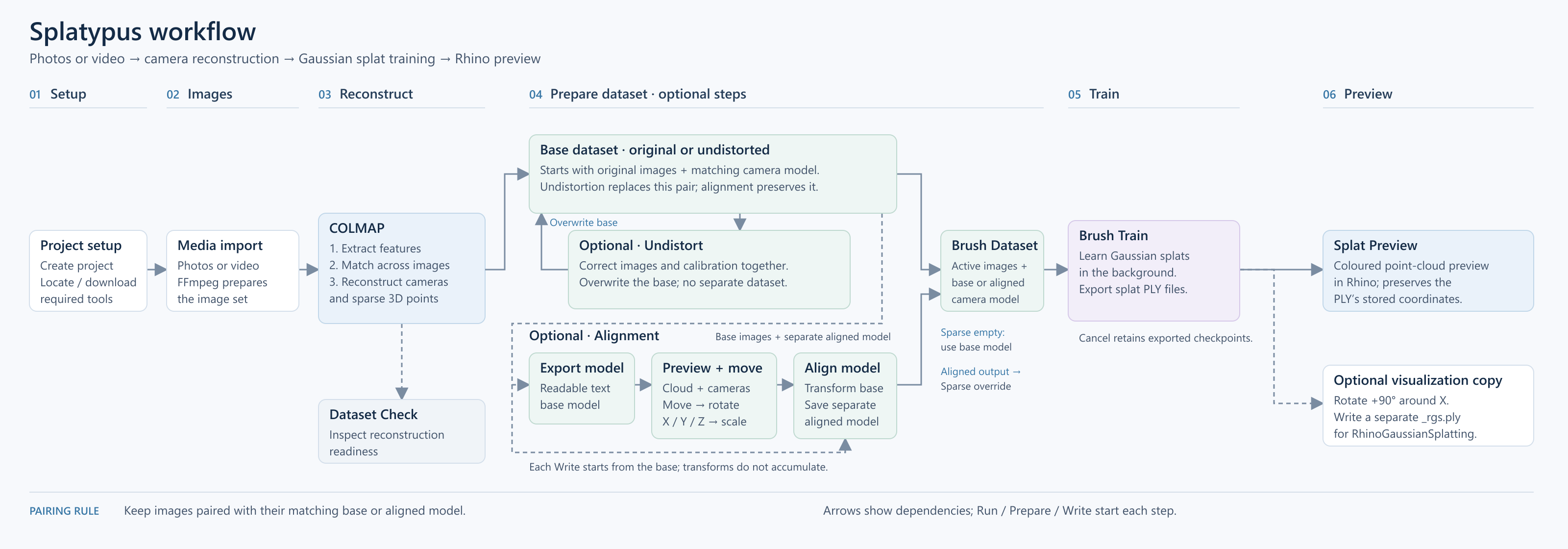
- 01 / Setup
A project and its tools
Create organized working folders. Download FFmpeg, COLMAP and Brush on request, or reuse existing installations through their executable paths.
- 02 / Dataset
Photos or video frames
Prepare JPEG or PNG images from photographs and video. Set sampling FPS, inspect the estimated image count and optionally skip near-duplicate frames while retaining playback timing.
- 03 / COLMAP
Cameras and sparse points
Extract and match features, reconstruct cameras and export the model. Run stages together or individually. Choose Exhaustive, Sequential, Spatial or Auto matching and set feature extraction size and count. Image undistortion is optional.
- 04 / Realignment
A place in your Rhino model
Use Quick Align with three point pairs, then optionally translate, rotate and scale with Geometry Translator. Write the combined transform as a separate aligned camera and point model.
- 05 / Training
A matched dataset for Brush
Connect Active Dataset to Brush Dataset. Train from the base or supply the aligned model as an override. Set the job name, steps, training resolution and maximum splat count, then follow progress, logs and cancellation.
- 06 / Preview
Inspect, replay and recapture
Inspect exported PLY point centers or replay a reconstructed video track. Capture the Rhino scene from camera frames into a fresh calibrated dataset, ready for another round of Brush training.
A second route: capture the Rhino scene
Connect Camera Planes → Frames to View Capture → Frames. Use a fresh destination project Root, inspect the captured PNGs, then connect View Capture → Dataset → Brush Dataset → Brush Train. Use that destination Root for training and leave the sparse model override empty.
Capture uses a visible Rhino viewport and new pinhole calibration. Keep the viewport unchanged during the batch; raytraced and progressive modes are unsupported. Auto Background can supply a solid or gradient fill. Read the full workflow ↗
03 25 components, six stages
The 0.2.0 toolbar follows the sequence from setup to preview. Expand a group for the individual components. The retained Model Report component is hidden from the toolbar.
01 / Setup3 components
- SP Hello
- Confirm that the plugin is loaded.
- SP Project
- Create the shared project root and working folders.
- SP Download Tools
- Download or reuse the external processing tools.
02 / Dataset2 components
- SP FFmpeg Setup
- Validate the FFmpeg executable path.
- SP Media Import
- Prepare JPEG/PNG images with frame-count estimates and optional duplicate filtering.
03 / COLMAP7 components
- SP COLMAP Setup
- Validate the COLMAP executable path.
- SP COLMAP Feature Extract
- Extract features with controls for image size and feature count.
- SP COLMAP Match
- Choose Exhaustive, Sequential, Spatial or Auto matching.
- SP COLMAP Sparse Reconstruct
- Recover camera poses and sparse scene points.
- SP COLMAP Undistort Images
- Update images and camera calibration together.
- SP COLMAP Export Model
- Export a readable camera and point model.
- SP COLMAP Pipeline
- Run selected reconstruction stages in order.
04 / Realignment5 components
- SP Sparse Point Cloud
- Inspect reconstructed points in Rhino.
- SP Camera Planes
- Inspect camera positions and orientations; output frames for View Capture.
- SP Quick Align
- Fit three point pairs to Rhino geometry, with refinement, reset and RMS error.
- SP Geometry Translator
- Move, rotate and scale geometry; output ordered transforms.
- SP Align COLMAP Model
- Write a separate aligned model with matching points and camera poses.
05 / Training3 components
- SP Active Dataset
- Expose paired images and camera data with readiness checks.
- SP Brush Dataset
- Prepare linked images and the base or aligned model for Brush.
- SP Brush Train
- Launch training with resolution and splat-count controls, logs and cancellation.
06 / Preview5 components
- SP Splat Preview
- Display exported binary PLY files as sampled coloured point clouds.
- SP Auto Background
- Estimate and preview a solid or gradient backdrop from splat colors.
- SP Video Frames
- Group extracted frames by source video with timestamps and camera tracks.
- SP Video Playback
- Animate the Rhino camera with playback, seeking, speed and smoothing controls.
- SP View Capture
- Capture visible Rhino scenes into calibrated image datasets for Brush.
04 Get started
Requirements
Rhino 8.34.26223.11001 or newer, Grasshopper and .NET 8. Separate Windows x64 and macOS packages are available. Automatic Mac tool installation targets Apple Silicon; Intel Mac and Windows ARM automatic installation are unsupported. Native macOS testing of the new interactive workflows remains outstanding.
FFmpeg with ffprobe, COLMAP and Brush are separate applications, downloaded on request or supplied through manual paths. Brush needs a compatible graphics device; CPU COLMAP does not make training run on the CPU.
Install 0.2.0 in Rhino
- Download the ZIP for your platform. In Grasshopper, open File → Special Folders → Components Folder, then close Rhino. Extract the ZIP and copy its contents into a
Splatypussubfolder, keepingSplatypus.ghaandSplatypus.Core.dlltogether. - Restart Rhino. Find the Splatypus tab and connect SP Hello to a Panel. Its status should read
SP is loaded: Ready. - Disable the solver before opening the SP_020 workflow example. Review saved controls, set your own folders, media and tool paths, then save a working copy before running stages.
Alternatively, install the matching local Yak with Rhino’s Yak CLI. A GitHub release does not register a package in the public Package Manager catalog. Back up existing definitions and keep one installed copy.
Windows x64
Each package includes the manual, quick-start PDF and SP_020 working example. SHA-256 checksums ↗ · Previous version 0.1.0 ↗
Working with a first capture
Begin with a small set of sharp, overlapping photographs from varied viewpoints. Inspect the recovered cameras and points before training. Motion, reflections and textureless surfaces can reduce reconstruction quality.
Keep Root → Active Dataset → Brush Dataset connected. If using an aligned model, write the complete alignment and connect its Aligned Sparse Model output to Brush Dataset’s override. Re-prepare after changing reconstruction, undistortion or alignment. Moving previews alone does not update saved cameras.
Start with a short training test and a new job name. Use Buttons for Run and Cancel. Reset a held toggle to False before another run. Replacing a training job can overwrite previous exports. Keep original captures and important results backed up.
View Capture needs a fresh destination Root and a visible, unchanged viewport. Use its completed Dataset directly for Brush; do not reconstruct or undistort the synthetic captures. Lower the preview point limit for smoother navigation. For errors, inspect Status, Code and the job log; include software versions and a short reproduction when contacting support.
05 Development & next steps
Splatypus’s contribution is the coordination of existing reconstruction and training tools inside the design environment: consistent image/model pairs, inspectable intermediate results and editable scene placement. It is free and open source under the MIT License.
The release includes the 25 visible components above. Splat Preview displays point centers; a Gaussian splat viewport renderer is not bundled. Development also explores COLMAP-based mesh reconstruction and Rhino mesh reduction. This reconstructs a surface from photographs and cameras; it is separate from meshing a trained Gaussian scene and is not included in the current release toolbar.
Version 0.2.0 connects three-point alignment, recovered camera playback and scene recapture to the training workflow. The public GitHub repository includes the source, documentation and versioned packages for both 0.2.0 and 0.1.0. Broader camera-model inputs and longer-term COMPAS interoperability remain possible directions for development.
Developed by Zeming Li · 2026
Questions & feedback ↗